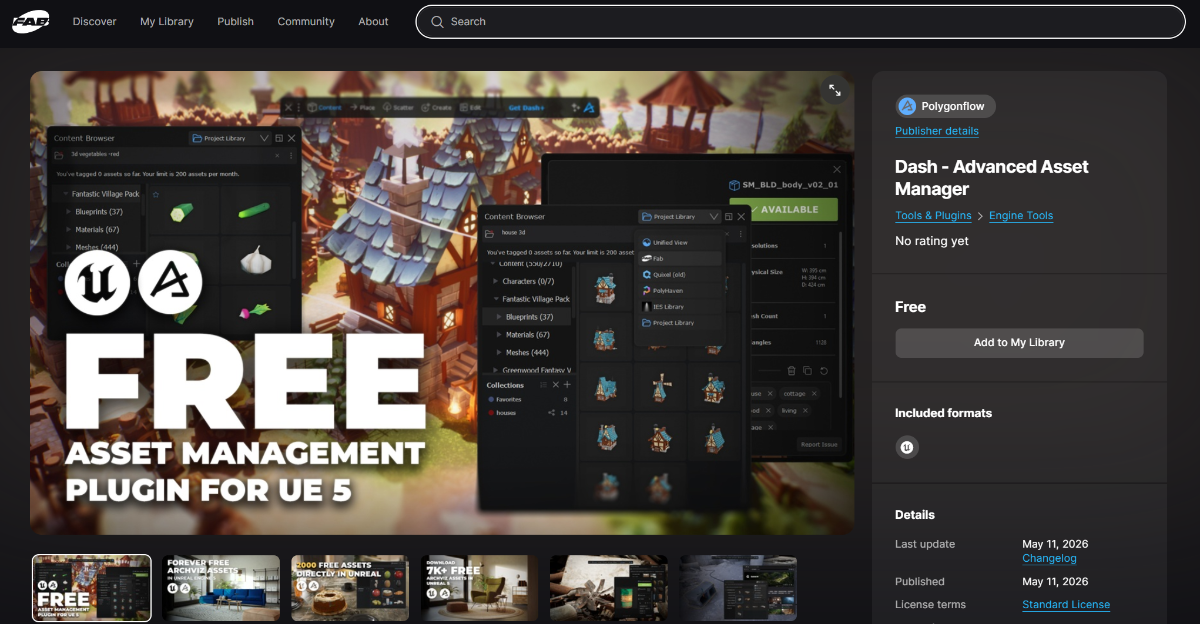
New release: Dash Content Browser arrives for free on FAB for Unreal Engine 5
Polygonflow has made Dash Content Browser available for free on FAB (Epic Games’ marketplace), a powerful Advanced Asset Manager designed to revolutionize the workflow of artists, environment artists, and level designers in Unreal Engine 5.
What is Dash Content Browser?
It is a lightweight plugin that transforms asset management in Unreal Engine.
Instead of working with projects overloaded with assets (sometimes unnecessary) or having to open external bridges every time, Dash allows you to:
Browse all your assets from a single centralized interface
Drag & Drop directly into the viewport from any library
Access thousands of high-quality free PBR assets without downloading anything into your project until you actually use them
Integrated Libraries (All Free)
The plugin includes native support for:
Megascans (via FAB or Quixel Bridge)
Amazon Berkeley Objects — over 6,900 real 3D models
AmbientCG — 2,300+ textures, HDRIs, and decals
Poly Haven — 1,900+ 3D assets, textures, and HDRIs
The Base Mesh — 1,400 clean low-poly models
The IES Library — 1,300 high-quality lighting presets
You can also easily add your own personal assets and tag them (up to 1,000 per month) to find them instantly.
Main Benefits
Zero unnecessarily heavy projects — assets remain outside the project until you drag them in.
Cross-project access — the same assets are available across all your UE 5.7 projects without copying them.
Smart collections system — organize assets by workflow or team.
Advanced search and tagging — find everything in seconds.
Asset details before import (polygon count, resolution, scale, etc.).
How to Install It (in 2 Minutes)
Add the plugin from the FAB page: Dash on FAB
Install it in your Unreal Engine 5.7
Enable it in the Plugin Settings
Click the Dash icon in the central toolbar
Note: Currently, only UE 5.7 is supported. If you need support for earlier versions, request it on Polygonflow’s Discord.
Limitations of the FAB Version (Important)
This free version on FAB includes only the Content Browser.
You will not have access to Dash’s other tools (procedural scattering, mesh tools, physics, materials, etc.).
To access the full suite, you need to download the complete version from the Polygonflow website.
It is not possible to have both versions installed at the same time.
Who Is It For?
Environment artists working across multiple projects
Archviz and product visualization professionals
Anyone using large amounts of free assets (Poly Haven, Megascans, AmbientCG, etc.)
Teams that want centralized and organized asset management
Useful Links
Plugin on FAB → Go to the page
Official Documentation → Dash Content Browser
If you're looking for an introduction to Dash, Biunivoca is the only authorized Dash training center in Italy.
Latest posts
Free FAB resources - until 20 October 2026
New assets available for free on FAB, available until October 20, 2026

Unreal Engine Animation Studio: The basics of motion in UE 5.8
Unreal Engine Animation Studio: 12 weeks to master UE 5.8 animation tools and bring intention to movement.

MetaHuman Creator Web App: Closing November 5, 2026
Epic Games chiude l’app web di MetaHuman Creator il 5 novembre 2026. Dopo restano 90 giorni per recuperare i personaggi. Le funzionalità restano in Unreal Engine 5.6+. Esporta ora via Quixel Bridge.